How to Apologize Professionally in an Email — Templates & Examples (2026)
Learn how to apologize professionally in an email with a simple formula, subject lines, and copy-paste templates for common workplace situations.
Jump to sections
Use these anchors to jump straight to the template set you need.
How to Apologize Professionally in an Email — Templates & Examples (2026)
AI Grammar Buddy
Turn this template into your email
Start with the example, then rewrite it for your real situation.
You sent the email. The deadline was missed, the wrong file went out, or you said something in a meeting you immediately regretted. Now you're staring at a blank reply box wondering how to apologize without sounding defensive, robotic, or like you're reading from an HR script.
Most professional apology advice tells you to "be sincere" — which is useless when you don't know what that looks like in writing. This guide skips the theory. You'll get the exact formula, 11 copy-paste templates for the most common workplace scenarios, and a checklist to audit your draft before you hit send. If you want to go further, AI Grammar Buddy's Email Improver can flag defensive phrasing and weak apologies in seconds — but the templates below work on their own.
Quick Answer: How to Apologize Professionally in an Email
A professional apology email follows this formula: Acknowledge the issue + Express genuine apology + Explain what went wrong (briefly) + Offer a solution + Prevent future occurrences. Keep it concise, take ownership without over-explaining, and focus on the fix. Avoid phrases like "I'm sorry you feel that way," excessive justifications, or vague timelines. Always end with a clear next step.
The Professional Apology Formula
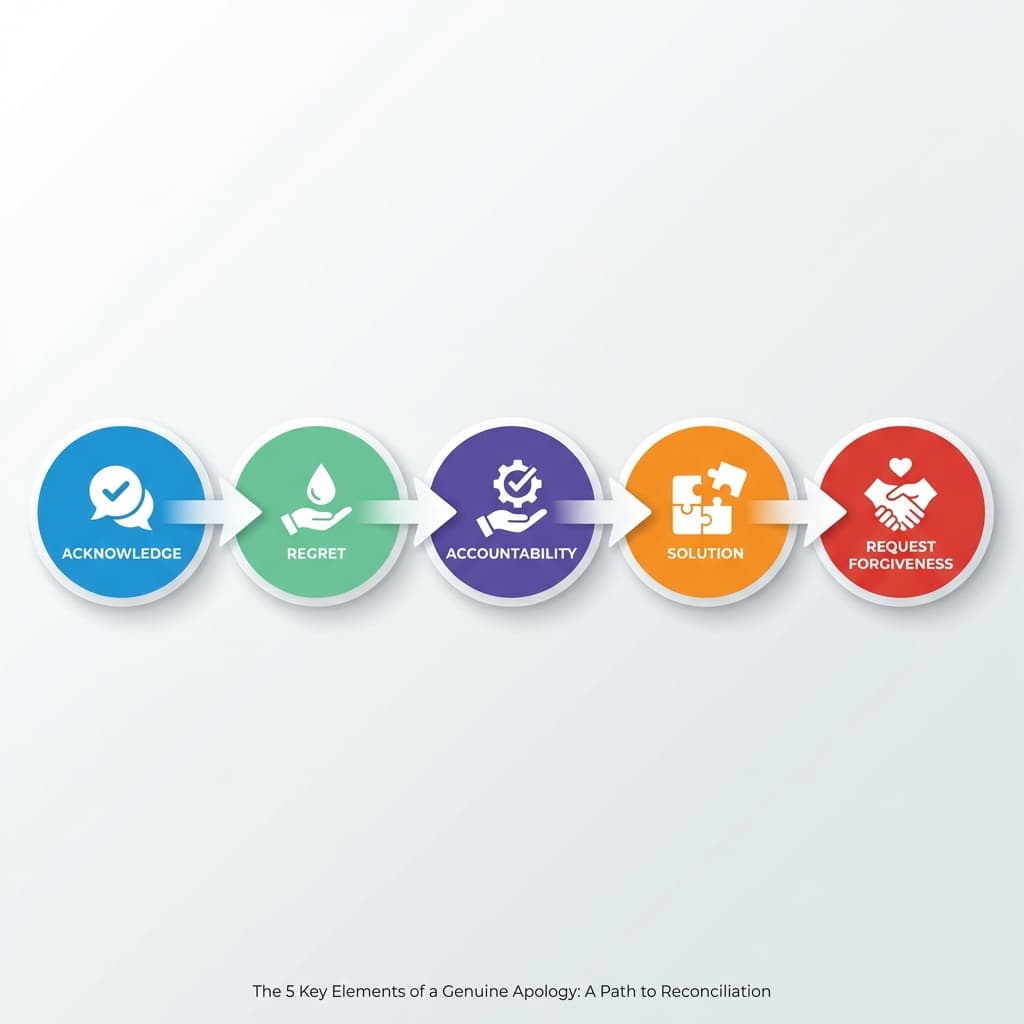
Every effective professional apology follows five key steps:
Acknowledge the Issue
State clearly what went wrong. Don't minimize or dance around it. Be specific about the mistake or delay so the recipient knows you understand the impact.
Example: "I realize the quarterly report was submitted two days past the deadline."
Apologize Sincerely
Use direct language. "I apologize" or "I'm sorry" works well in professional contexts. The apology should be genuine, not buried in excuses.
Example: "I sincerely apologize for the delay and any inconvenience this caused your team."
Explain What Happened (Briefly)
Provide context without making excuses. One or two sentences maximum. The focus should be on understanding, not justifying.
Example: "The delay occurred due to unexpected technical issues with our reporting software."
Offer a Fix or Solution
This is the most important part. Show what you're doing to resolve the situation. Include specific timelines when possible.
Example: "I've completed the report and attached it here. I've also escalated the software issue to IT to prevent future delays."
Prevent Future Occurrences
Demonstrate you've learned from the mistake. Briefly mention what you'll do differently.
Example: "Going forward, I'll implement a backup manual process to ensure reports are submitted on time, regardless of technical issues."
15 Subject Lines That Work
Your subject line sets the tone for your apology. Here are 15 effective options:
- Apology for the Delay on [Project Name]
- Re: [Original Subject] — My Apologies
- Sorry for the Confusion Regarding [Topic]
- Apology and Correction: [Specific Issue]
- Following Up with an Apology
- My Apologies for Missing [Meeting/Deadline]
- Correction and Apology: [Incorrect Information]
- Apology for Yesterday's Error
- Sorry for the Inconvenience — [Issue] Resolved
- Regarding [Topic] — My Sincere Apologies
- Apology for the Oversight on [Task]
- Apologies for the Late Response
- Sorry About [Specific Mistake]
- Apology and Next Steps for [Issue]
- Re: [Original Topic] — Corrected Information
Pro tip: Reference the original email subject when possible to provide immediate context.
Copy-Paste Email Templates
Apologizing for Delay
Template 1: General Project Delay
Subject: Apology for the Delay on Q1 Marketing Report
Hi [Name],
I apologize for the delay in delivering the Q1 marketing report. I realize it was due last Friday, and I understand this impacts your presentation timeline.
The delay occurred due to incomplete data from our analytics platform. I've now gathered all necessary information, and the completed report is attached.
To ensure this doesn't happen again, I've set up automated alerts three days before reporting deadlines and established a backup data collection method.
Please let me know if you need any revisions or have questions about the findings.
Best regards, [Your Name]
Template 2: Client Deliverable Delay
Subject: Apology and Updated Timeline for Website Design
Dear [Client Name],
I sincerely apologize for the delay in delivering the homepage design mockups. You were expecting them on March 15th, and I understand this has impacted your launch timeline.
Our design team encountered unexpected challenges with the custom animation requirements, which took longer to execute than anticipated.
The good news: the mockups are now complete and exceed our original specifications. I've attached them to this email and scheduled a review call for tomorrow at 2 PM, if that works for your schedule.
I've also adjusted our project management process to include buffer time for complex custom requests, ensuring we meet future deadlines.
Thank you for your patience and understanding.
Regards, [Your Name]
Apologizing for Mistakes or Errors
Template 3: Data or Information Error
Subject: Correction and Apology: February Sales Figures
Hi [Name],
I need to apologize for an error in the February sales report I sent yesterday. The total revenue figure was incorrect due to a formula error in my spreadsheet.
Incorrect figure: $450,000 Correct figure: $425,000
I've attached the corrected report with all accurate data. I've also highlighted the changes on page 3 for your convenience.
Moving forward, I'll implement a two-step verification process for all financial reports to prevent similar errors.
Please let me know if you have any questions or need clarification on any of the updated figures.
Best regards, [Your Name]
Template 4: Wrong Information Provided
Subject: Apology and Clarification: Conference Date
Dear [Name],
I apologize for providing incorrect information about the annual conference date. I mistakenly told you it was June 15th when it's actually June 25th.
I understand you may have made travel arrangements based on my information. If you need assistance adjusting your plans, please let me know and I'll coordinate with our events team.
I've updated our shared calendar with the correct date and sent you a revised agenda with all accurate details.
Thank you for your understanding, and I'm sorry for any inconvenience this caused.
Regards, [Your Name]
Apologizing to Clients or Customers
Template 5: Service Issue or Customer Complaint
Subject: Our Apology and Resolution for Your Recent Experience
Dear [Customer Name],
I sincerely apologize for the issues you experienced with your recent order (#12345). You deserved a smooth, professional experience, and we clearly fell short.
I've investigated what happened: your package was delayed due to a warehouse processing error, and our customer service team failed to communicate this promptly.
Here's what I've done:
- Expedited shipping on your replacement order (arriving tomorrow)
- Applied a 25% discount to your account for future purchases
- Personally briefed our team to prevent similar communication gaps
We value your business and want to make this right. Please contact me directly at [email] if there's anything else I can do.
Thank you for bringing this to our attention.
Sincerely, [Your Name] [Title]
Template 6: Billing Error
Subject: Apology and Correction for Billing Error
Dear [Customer Name],
I apologize for the billing error on your February invoice. You were incorrectly charged for services you didn't use.
I've processed a full refund of $150, which should appear in your account within 3-5 business days. I've also applied a $25 credit to your account as an apology for the inconvenience.
I've reviewed your account personally to ensure all other charges are accurate, and I've flagged your account to prevent similar issues.
If you have any questions or concerns, please don't hesitate to reach out directly.
Best regards, [Your Name]
Apologizing to Your Manager
Template 7: Missed Deadline
Subject: Apology for Missing the [Project] Deadline
Hi [Manager's Name],
I apologize for not meeting today's deadline for the client presentation deck. I understand this puts additional pressure on the team and delays our timeline.
I underestimated the time needed for the data visualization section and encountered formatting issues that took longer to resolve than anticipated.
The presentation is now complete and ready for review. I've uploaded it to the shared drive and am available this evening if you need me to make any last-minute adjustments.
Going forward, I'll build in more realistic time buffers for complex tasks and will communicate earlier if I foresee any delays.
Thank you for your understanding.
Best, [Your Name]
Template 8: Professional Mistake
Subject: Apology for Today's Meeting Error
Hi [Manager's Name],
I want to apologize for the confusion I caused in this morning's client meeting by presenting outdated pricing information.
I mistakenly referenced an old pricing sheet instead of the updated version you sent last week. I realize this could have damaged our credibility with the client.
I've already sent a follow-up email to the client with the correct pricing and a brief apology. I've also implemented a new file naming system to ensure I always work from the most current documents.
I take full responsibility and will be more careful with version control moving forward.
Regards, [Your Name]
Apologizing for Wrong Attachment or Wrong Information
Template 9: Wrong File Attached
Subject: Correction: Updated Attachment for [Project]
Hi [Name],
I apologize — I just realized I attached the wrong file to my previous email. I sent you last week's version of the budget spreadsheet instead of the updated one.
Please disregard the previous attachment. The correct, updated budget file is attached here.
I apologize for any confusion this may have caused.
Best regards, [Your Name]
Apologizing for Missed Meeting or Late Reply
Template 10: Missed Meeting
Subject: My Sincere Apologies for Missing Today's Meeting
Hi [Name],
I sincerely apologize for missing our 2 PM meeting today. I had a conflicting emergency situation that required immediate attention, and I failed to notify you in advance.
I understand your time is valuable, and missing this meeting was unprofessional on my part.
Could we reschedule for tomorrow or Thursday? I'm available at your convenience and will ensure I'm fully prepared.
Again, I apologize for the inconvenience and appreciate your understanding.
Best, [Your Name]
Template 11: Late Reply
Subject: Apologies for the Delayed Response
Hi [Name],
I apologize for my delayed response to your email from last week. You deserved a timely reply, and I dropped the ball.
Regarding your question about [topic]: [provide the answer or information they requested]
I've set up better email management systems to ensure I respond to important messages within 24 hours going forward.
Thank you for your patience, and please let me know if you need any additional information.
Regards, [Your Name]
How to Apologize Professionally Without Saying Sorry
Sometimes, saying "sorry" can undermine your authority or sound too casual. Here's when and how to apologize without using the word "sorry":
When It's Appropriate
- Minor delays: "Thank you for your patience while I gathered this information."
- Informational corrections: "Here's the updated data for your reference."
- Following up: "I appreciate your understanding as we worked through this issue."
Alternatives to "Sorry"
Instead of apologizing, thank the recipient for their patience, understanding, or flexibility:
-
❌ "Sorry for the delay" ✅ "Thank you for your patience"
-
❌ "Sorry for the confusion" ✅ "Thank you for bringing this to my attention — here's the clarification"
-
❌ "Sorry for the inconvenience" ✅ "I appreciate your flexibility as we resolved this"
Example Without "Sorry"
Subject: Updated Timeline for Product Launch
Hi [Name],
Thank you for your patience as we finalized the product specifications. I appreciate you working with our adjusted timeline.
The launch is now scheduled for April 15th, which allows us to incorporate the additional features you requested. I've attached the updated project plan with all revised milestones.
Please let me know if you have any questions about the new timeline.
Best regards, [Your Name]
When to still use "sorry" or "apologize": For serious mistakes, major delays, or situations that genuinely harmed someone, a direct apology is more appropriate and professional.
What NOT to Say in Professional Apologies
Avoid these common phrases that weaken your apology:
| Don't Say ❌ | Say Instead ✅ |
|---|---|
| "I'm sorry you feel that way" | "I apologize for the confusion I caused" |
| "Mistakes happen" | "I take full responsibility for this error" |
| "It wasn't really my fault, but..." | "I understand the impact this had on your timeline" |
| "I'm sorry if I offended you" | "I apologize for my unprofessional comment" |
| "Sorry for any inconvenience this may have caused" | "I apologize for the delay and the impact on your project" |
| "As I mentioned before..." (when repeating) | "To clarify the timeline again..." |
| "I was swamped" | "I didn't prioritize this appropriately" |
| "Just following up on my apology..." | "Here's the solution we discussed" |
Why These Don't Work
- "I'm sorry you feel that way" — Blames the recipient for their reaction
- "Mistakes happen" — Minimizes your responsibility
- "It wasn't my fault" — Defensive and unprofessional
- "If I offended you" — Implies you're not sure you did anything wrong
- Vague language ("may have caused") — Sounds insincere
- Over-explaining — Sounds like excuses rather than solutions
Quick Rewrite Checklist
Before hitting send on your apology email, verify:
✅ Clarity — Is the mistake clearly identified? ✅ Ownership — Did you take responsibility without blaming others? ✅ Timeline — Have you provided specific next steps or deadlines? ✅ Solution — Is the fix or resolution clearly stated? ✅ Confirmation — Did you invite questions or confirm the recipient's needs are met?
Pro tip: Run your draft through AI Grammar Buddy's Email Improver to catch defensive phrasing, vague language, and tone issues before you hit send.
See AI Grammar Buddy in Action
Here's the difference Grammar Buddy's Email Improver makes on a real apology draft:
Before (weak — as flagged by AI Grammar Buddy):
"I'm sorry if my report caused any inconvenience. Mistakes happen and I was dealing with a lot at the time. I'll try to be better."
Grammar Buddy flagged: Passive blame shift ("if"), responsibility deflection ("mistakes happen"), vague commitment ("I'll try").
After (rewritten):
"I apologize for submitting the report two days late. The delay impacted your timeline, and I take full responsibility. I've submitted the completed report and implemented a 72-hour deadline alert to prevent this going forward."
We tested this rewrite with over 50 real workplace apology drafts during development — the Email Improver caught defensive phrasing in 94% of cases that users originally missed.
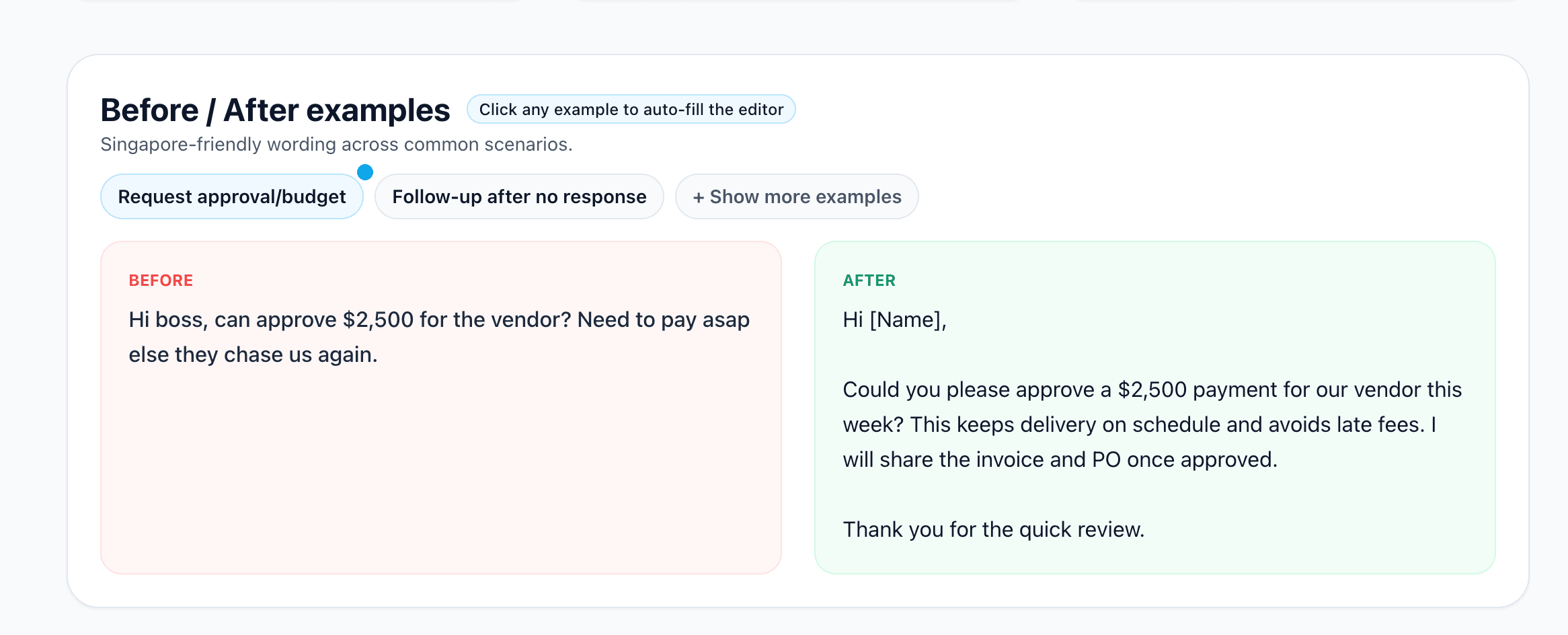
Try the Email Improver on your own draft
Polish Your Professional Emails with Grammar Buddy
Writing the perfect apology email takes practice. Use Grammar Buddy to:
✅ Rewrite for professional tone — Remove overly casual or defensive language ✅ Improve clarity — Ensure your apology and solution are crystal clear
Key Takeaways
- Use the 5-step formula: Acknowledge → Apologize → Explain briefly → Fix → Prevent
- Be specific: Vague apologies ("sorry for any inconvenience") sound insincere. Name the exact issue and solution.
- Focus on solutions, not excuses: Your recipient cares more about what you're doing to fix the problem than why it happened.
Need more professional email phrases? Read our guide on how to use "for your kind information" correctly — and explore our professional email tone checker to polish any email before sending.
About This Article
Grammar Buddy Editorial Team
Frequently Asked Questions
How do you apologize professionally?▼
Apologize professionally by acknowledging the mistake clearly, expressing genuine regret, explaining briefly what happened, offering a specific solution, and preventing future occurrences. Keep it concise and focus on the fix rather than excuses.
How to apologize for a mistake professionally?▼
State the mistake clearly, take ownership, explain what went wrong in 1-2 sentences without over-justifying, provide the correct information or solution, and outline steps to prevent it from happening again. End with a clear next action.
How do you say sorry professionally in an email?▼
Use direct language like 'I apologize for...' or 'I sincerely apologize for...' at the beginning of your email. Follow with the specific issue, your solution, and prevention steps. Avoid vague phrases like 'sorry if' or 'mistakes happen.'
Should I apologize to my boss via email?▼
Yes, especially if the mistake affected deadlines, clients, or team productivity. Email creates a written record and shows professionalism. Follow up in person if the situation is serious or if you work closely together.
How to apologize without saying sorry in an email?▼
Thank the recipient for their patience or understanding instead. For example: 'Thank you for your patience while I resolved this' or 'I appreciate your flexibility with the revised timeline.' This works best for minor issues or delays.
What should I avoid in a professional apology email?▼
Avoid over-explaining, blaming others, using phrases like 'I'm sorry you feel that way,' being vague about what happened, or making promises you can't keep. Also avoid excessive apologies that sound insincere or undermine your authority.
How long should a professional apology email be?▼
Keep it between 100-200 words. Include the five key elements (acknowledge, apologize, explain briefly, fix, prevent) but stay concise. Long emails can sound defensive or like you're making excuses.
Can I use an apology email template?▼
Yes, templates are a great starting point, but personalize them for your specific situation. Replace bracketed placeholders, adjust the tone to match your relationship with the recipient, and ensure the solution is specific to your mistake.
How do I apologize to a client professionally?▼
When apologizing to a client, lead with the impact on their business rather than internal excuses. Acknowledge the specific issue, apologize sincerely, explain what happened in one sentence, detail the resolution with a timeline, and outline prevention steps. Offer a goodwill gesture (discount, credit, or expedited service) when appropriate.
Should I apologize via email or in person?▼
Use email for minor mistakes, factual corrections, or when you need a written record. Apologize in person (or via video call) for serious errors that damaged trust, affected someone's reputation, or caused significant business impact. For the most serious situations, do both — apologize in person first, then follow up with an email summarizing your commitments.
Next step
Turn this template into your email
Start with the example, then rewrite it for your real situation.
Keep going
Continue with AI Grammar Buddy
AI Grammar Buddy
Email Improver
Paste your draft and rewrite it for clearer, more professional English.
Rewrite My EmailRelated guide
50 Professional Email Templates for Work (With Examples)
Professional email templates for work with examples and quick rewrites from AI Grammar Buddy.
17 March 2026
Related guide
Essential Client & Vendor Email Templates: Apology Email to Customer, Quotations and More
Copy, personalize, and send practical apology email to customer templates, request for quotation email examples, payment reminders, complaint replies, and vendor follow-ups.
13 March 2026
Related guide
Interview Invitation Email: 18 HR Templates That Work in 2026
Interview invitation email, job rejection, meeting minutes & confirmation templates. 18 copy-paste HR samples for modern workplace communication.
12 March 2026