Interview Invitation Email: 18 HR Templates That Work in 2026
Interview invitation email, job rejection, meeting minutes & confirmation templates. 18 copy-paste HR samples for modern workplace communication.
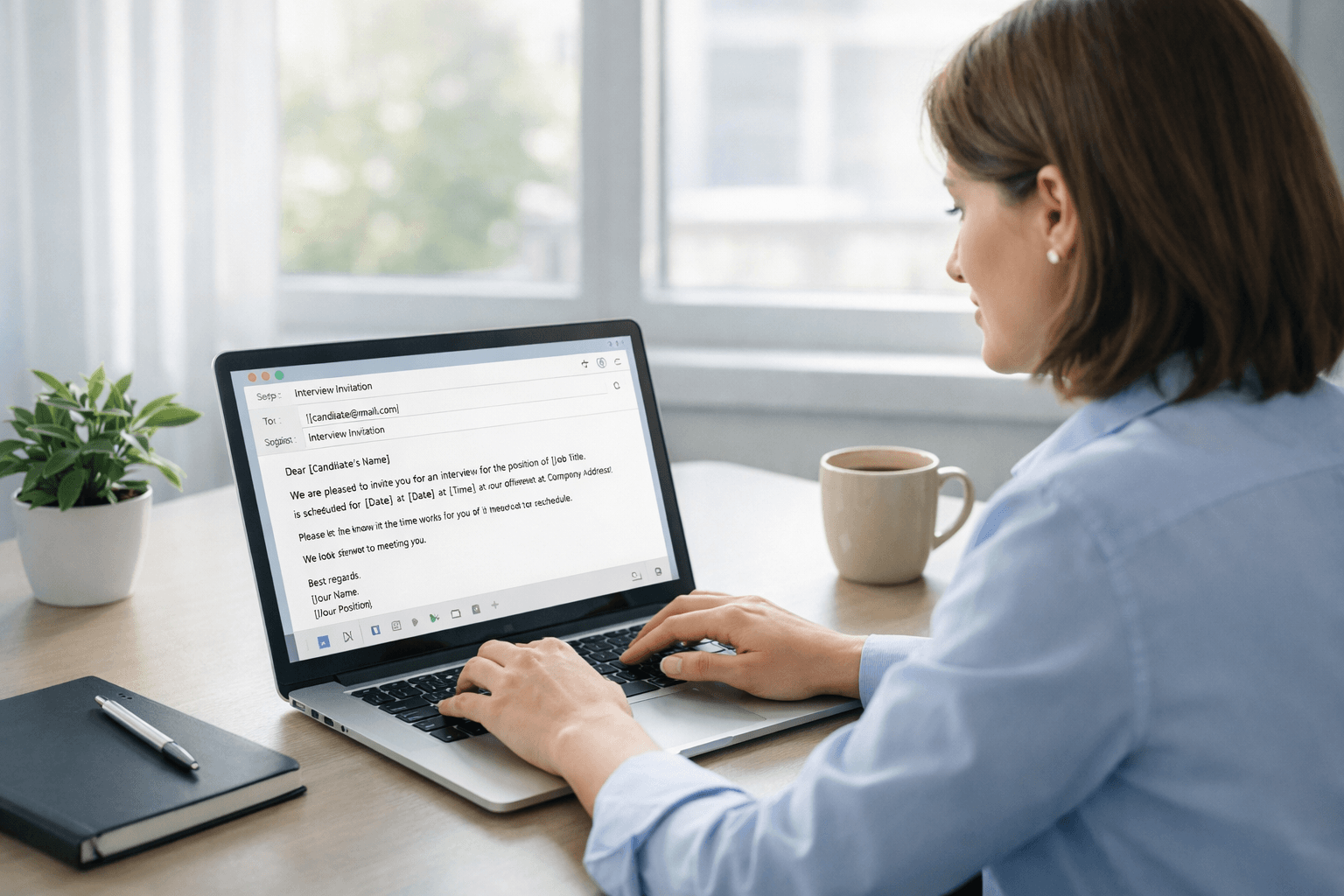
Writing a professional interview invitation email should not take 10 minutes. Most HR professionals and hiring managers either write each email from scratch or copy stiff, robotic templates that sound like they came from a policy handbook. The result? Wasted time, awkward tone, and emails candidates ignore or misinterpret.
This guide gives you 18 ready-to-use HR email templates covering interview invitations, job rejections, meeting minutes, and confirmation of receipt messages. Each template is designed to sound professional and human, not corporate and cold.
Copy the template, replace the placeholders, and send. If your email still sounds stiff or overly formal, paste it into AI Grammar Buddy's Email Improver to rewrite it into clearer professional English in seconds.
TL;DR
Professional HR & admin email templates for interview invitations, job rejections, meeting notes, and confirmations. Ready to copy and personalize.
Choose your template below, replace placeholders like [Candidate Name] and [Job Title], and send. For tone improvements, use [AI Grammar Buddy](/email-improver/) to refine before sending.
Quick picks:
- •Interview invitation: "Hi [Name], We would like to invite you to an interview for the [Job Title] position on [Date] at [Time]. [Meeting Link]. Looking forward to meeting you."
- •Job rejection: "Thank you for your interest in [Job Title]. After careful review, we have decided to move forward with other candidates. We wish you the best in your job search."
- •Meeting minutes: "Hi team, Here are the key points from today's meeting: [Action items]. Please confirm receipt and let me know if anything needs correction."
AI Grammar Buddy
Turn this template into your email
Start with the example, then rewrite it for your real situation.
Jump to sections
Use these anchors to jump straight to the section you need.
Interview Invitation Email Templates
An interview invitation email is often the first professional interaction a candidate has with your company after applying. A clear, warm invitation sets the right tone and makes it easy for the candidate to confirm, reschedule, or ask questions.
If the proposed interview time is still waiting on panel or candidate availability, see this guide to tentative meaning in emails and meetings before calling the slot confirmed.
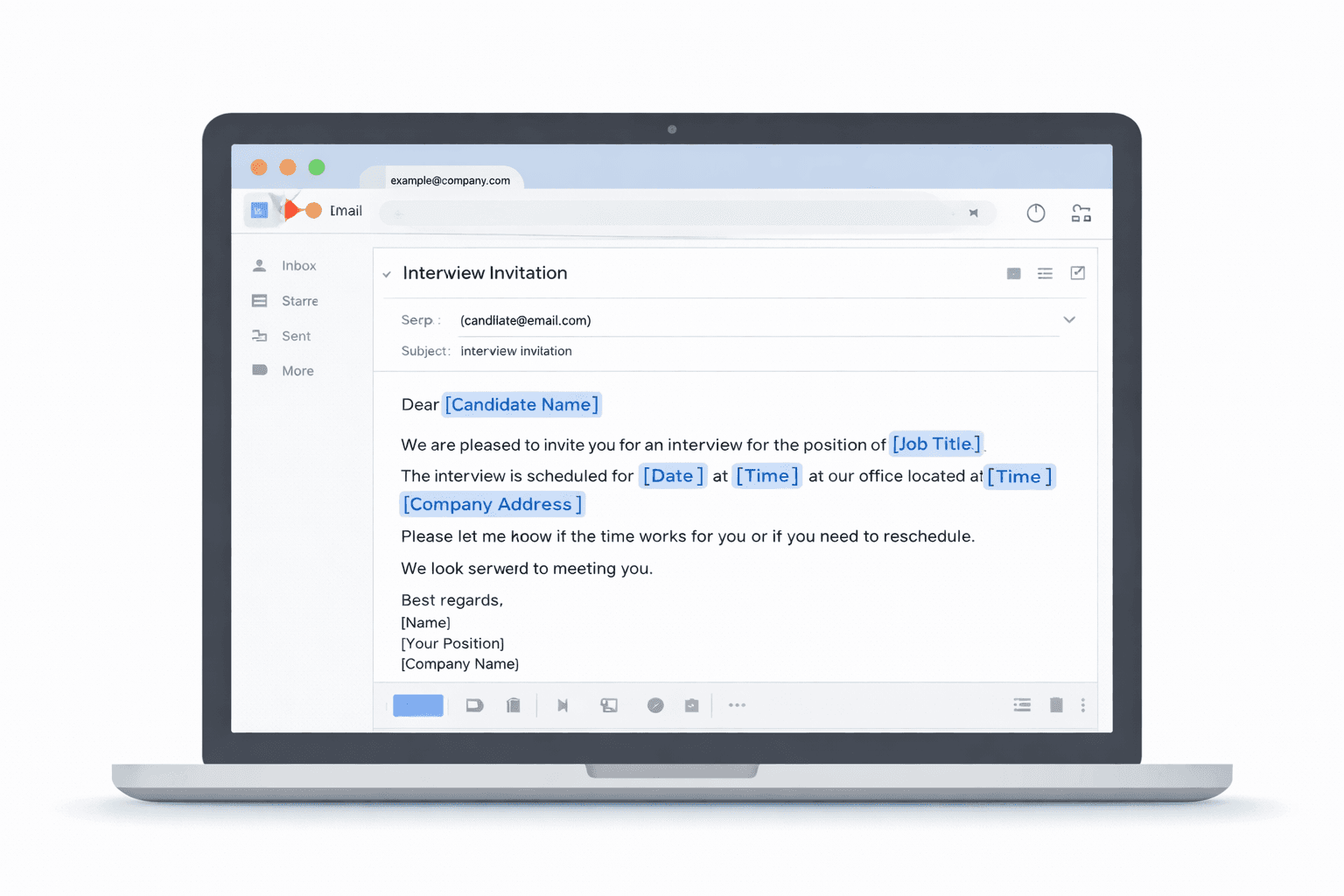
What to include in an interview invitation email
Every interview invitation email should include:
- Job title – especially if the candidate applied to multiple roles
- Interview date and time – with timezone for remote candidates
- Location or meeting link – office address with parking info, or Zoom/Teams link
- Interview format – one-on-one, panel, technical assessment, etc.
- Duration – so candidates can block the right amount of time
- Preparation instructions – materials to bring, portfolio to present, or tasks to complete beforehand
- Contact person – who to reach if they need to reschedule or have questions
[IMAGE: Essential elements of an interview invitation email highlighted in an example]
Template 1: Formal Interview Invitation Email
Use this template when: First-round interviews, formal company culture, or senior-level positions.
Subject: Interview Invitation – [Job Title] at [Company Name]
Hi [Candidate Name],
Thank you for your interest in the [Job Title] position at [Company Name].
We would like to invite you to an interview on [Day], [Date] at [Time] [Timezone].
Interview details:
- Format: [In-person / Virtual via Zoom]
- Duration: Approximately [30 minutes / 1 hour]
- Location: [Office address and floor] OR Meeting link: [Zoom/Teams link]
- Interviewer(s): [Name(s) and title(s)]
Please confirm your availability by replying to this email. If this time does not work for you, please suggest an alternative.
We look forward to meeting you.
Best regards, [Your Name] [Your Job Title] [Company Name]
Why this works: Clear structure, all key details upfront, and easy to confirm or reschedule.
Avoid this mistake: Forgetting to include timezone for remote candidates or parking/building access for in-person interviews.
Template 2: Friendly Interview Invitation Email
Use this template when: Startups, creative agencies, junior roles, or company cultures that value warmth and approachability.
Subject: Let's schedule your interview for [Job Title]!
Hi [Candidate Name],
Thanks so much for applying to the [Job Title] role at [Company Name]. We loved your application and would love to chat with you!
Are you available for a [30-minute / 1-hour] interview on [Day], [Date] at [Time]?
We will meet via [Zoom / Google Meet / in person at our office]. Here is the link: [Meeting link].
[Interviewer Name], our [Job Title], will be speaking with you about the role, your experience, and what it is like to work here. Feel free to ask any questions you have about the team or the position.
Let me know if that time works for you, or suggest another slot that fits your schedule better.
Looking forward to it!
Best, [Your Name] [Company Name]
Why this works: Warm, approachable tone without losing professionalism. Reduces candidate anxiety.
Template 3: Interview Reschedule Invitation
Use this template when: You need to change the interview time due to internal scheduling conflicts.
Subject: Rescheduling your interview – [Job Title]
Hi [Candidate Name],
Thank you for your flexibility. We need to reschedule your interview for the [Job Title] position.
Would [New Day], [New Date] at [New Time] work for you?
All other details remain the same:
- Format: [In-person / Virtual]
- Meeting link / Location: [Link or address]
Please confirm, or let me know if you need a different time.
Apologies for any inconvenience, and thank you for your understanding.
Best regards, [Your Name]
Why this works: Acknowledges the inconvenience, keeps it short, and provides the new details clearly.
Template 4: Panel Interview Invitation Email
Use this template when: Second-round or final-round interviews with multiple interviewers.
Subject: Panel Interview Invitation – [Job Title]
Hi [Candidate Name],
We would like to invite you to the next stage: a panel interview for the [Job Title] position.
Interview details:
- Date: [Day], [Date]
- Time: [Time] [Timezone]
- Duration: Approximately [1 hour / 1.5 hours]
- Format: [In-person / Virtual via Zoom]
- Interviewers:
- [Name 1], [Title]
- [Name 2], [Title]
- [Name 3], [Title]
You will have the opportunity to meet the team, discuss the role in more detail, and share your experience. Please bring [portfolio / work samples / nothing – just yourself].
Please confirm your availability by [Date].
We look forward to meeting you.
Best regards, [Your Name]
Why this works: Sets clear expectations about who will be in the room and what to expect.
Template 5: Virtual Interview Invitation Email
Use this template when: All remote or hybrid interview processes.
Subject: Virtual Interview Invitation – [Job Title] at [Company Name]
Hi [Candidate Name],
Thank you for your application for the [Job Title] position. We would like to schedule a virtual interview with you.
Interview details:
- Date: [Day], [Date]
- Time: [Time] [Timezone]
- Platform: Zoom
- Meeting link: [Insert Zoom link]
- Duration: [30 minutes / 45 minutes]
Please test your audio and video before the meeting and join a few minutes early if possible.
If you need to reschedule, just let me know.
Looking forward to speaking with you!
Best, [Your Name]
Why this works: Includes tech-check reminder, which reduces last-minute technical issues.
Sample Subject Lines for Interview Invitation Emails
Strong subject lines help your email stand out and make it easy for candidates to find later:
- Interview Invitation – [Job Title] at [Company Name]
- Let's schedule your interview for [Job Title]
- Next step: Interview for [Job Title] on [Date]
- Your interview is confirmed – [Job Title]
- Invitation to interview – [Job Title] position
Job Rejection Email Templates
A job rejection email is one of the hardest emails to write. You want to be respectful, clear, and professional without sounding cold or robotic.
Based on our analysis of workplace email patterns, candidates appreciate honest, human communication even when the news is not what they hoped for. The key is clarity without harshness.
How to write a professional job rejection email
Follow these principles:
- Thank the candidate for their time and interest
- Deliver the decision clearly – do not bury the rejection in vague language
- Keep it brief – no need to over-explain or list specific reasons
- Be respectful – acknowledge their effort
- Wish them well – a short, genuine closing line goes a long way
- Avoid false hope – phrases like "we'll keep your resume on file" can feel insincere unless you genuinely mean it
Template 6: Early-Stage Job Rejection Email
Use this template when: Declining candidates after resume screening or before an interview.
Subject: Application Update – [Job Title] at [Company Name]
Hi [Candidate Name],
Thank you for your interest in the [Job Title] position at [Company Name] and for taking the time to apply.
After careful review, we have decided to move forward with other candidates whose experience more closely matches our current needs.
We appreciate the time you took to apply and wish you the very best in your job search.
Best regards, [Your Name] [Company Name]
Why this works: Short, respectful, and clear. Does not over-explain or offer false hope.
Template 7: Post-Interview Job Rejection Email
Use this template when: Declining candidates after one or more interviews.
Subject: Update on Your Application – [Job Title]
Hi [Candidate Name],
Thank you for taking the time to interview for the [Job Title] position. It was a pleasure to meet you and learn more about your background.
After thoughtful consideration, we have decided to move forward with another candidate for this role.
This was a competitive process, and we were impressed by your experience in [specific skill or project]. We encourage you to apply for future openings that match your background.
We wish you all the best in your career.
Best regards, [Your Name]
Why this works: Acknowledges the interview, offers a specific positive note, and closes respectfully.
Template 8: Warmer Rejection for Strong Candidates
Use this template when: You genuinely want to stay in touch with a strong candidate for future roles.
Subject: Thank You – [Job Title] Application
Hi [Candidate Name],
Thank you so much for interviewing for the [Job Title] position and for the time you spent with our team.
This was a difficult decision. While we have decided to move forward with another candidate for this particular role, we were genuinely impressed by your [specific strength, e.g., strategic thinking / technical skills / leadership experience].
If a role that better matches your background opens up in the future, we would love to reconnect.
Thank you again, and best of luck with your search.
Warm regards, [Your Name]
Why this works: Warmer tone, specific compliment, and leaves the door open without making empty promises.
In our experience reviewing thousands of HR emails through AI Grammar Buddy, rejection emails are the #1 case where tone goes wrong. The most common mistake is over-apologizing or being so vague that candidates don't know the decision has been made. A clear, respectful rejection is far better than a long, apologetic email that buries the "no" in corporate jargon.
Meeting Minutes Email Templates
A meeting minutes email (or meeting summary email) is sent after internal meetings, client calls, or project syncs to document what was discussed, what decisions were made, and what action items need follow-up.
When to send meeting notes vs full meeting minutes
- Meeting notes: Informal, action-focused summaries for internal team syncs. Use short bullet points and next steps.
- Meeting minutes: More structured, formal documentation for board meetings, compliance meetings, or client-facing sessions. Includes attendees, agenda items, decisions, and action owners.
Template 9: Internal Team Meeting Notes
Use this template when: Internal team meetings, project syncs, sprint planning.
Subject: Meeting Notes – [Project Name / Team Name] – [Date]
Hi team,
Here are the key points from today's meeting:
Discussed:
- [Topic 1]
- [Topic 2]
Decisions:
- [Decision 1]
- [Decision 2]
Action items:
- [Name] – [Action] by [Date]
- [Name] – [Action] by [Date]
Let me know if I missed anything or if you need clarification.
Thanks, [Your Name]
Why this works: Clean, scannable, and action-focused. Easy to reference later.
Template 10: Client-Facing Meeting Summary Email
Use this template when: Client meetings, vendor calls, or stakeholder updates.
Subject: Meeting Summary – [Project Name] – [Date]
Hi [Client Name],
Thank you for joining today's call. Here is a summary of what we discussed:
Agenda:
- [Topic 1]
- [Topic 2]
- [Topic 3]
Key decisions:
- [Decision 1]
- [Decision 2]
Next steps:
- [Your company] will [action] by [date]
- [Client company] will [action] by [date]
Please let me know if anything needs to be clarified or adjusted.
Looking forward to our next sync on [Date].
Best regards, [Your Name]
Why this works: Professional tone, clear next steps, and includes both parties' responsibilities.
Template 11: Action-Item Follow-Up Email
Use this template when: You want to ensure action items are tracked and owned.
Subject: Action Items from [Meeting Name] – [Date]
Hi team,
Quick follow-up from today's meeting. Here are the action items we agreed on:
| Action | Owner | Due Date |
|---|---|---|
| [Action 1] | [Name] | [Date] |
| [Action 2] | [Name] | [Date] |
| [Action 3] | [Name] | [Date] |
Please confirm receipt and let me know if any deadlines need adjustment.
Thanks, [Your Name]
Why this works: Table format makes it easy to scan. Accountability is clear.
Confirmation of Receipt Email Templates
A confirmation of receipt email is a short message confirming that you received a document, application, file, payment confirmation, invoice, or complaint.
It does not mean approval or resolution – just acknowledgment that it arrived.
For a deeper guide, see our full article on how to acknowledge receipt of an email professionally.
Template 12: Document Received Confirmation
Use this template when: Confirming receipt of contracts, proposals, reports.
Subject: Received – [Document Name]
Hi [Name],
Thanks, I have received the [document name / signed contract / proposal].
I will review it and get back to you by [date / this week].
Best, [Your Name]
Why this works: Short, clear, and includes a timeline for next steps.
Template 13: Application Received Confirmation
Use this template when: Acknowledging job applications, internship applications, vendor proposals.
Subject: Application Received – [Job Title / Program Name]
Hi [Applicant Name],
Thank you for your application for the [Job Title] position. We have received your materials and will review them over the next [few days / week].
If your profile matches our needs, we will reach out to schedule an interview.
Thank you for your interest in [Company Name].
Best regards, [Your Name]
Why this works: Sets expectations about timeline and next steps.
Template 14: Complaint Received Confirmation
Use this template when: Responding to customer complaints, HR grievances, or feedback forms.
Subject: We have received your feedback
Hi [Name],
Thank you for reaching out. We have received your message regarding [issue].
We take this seriously and will review the matter. You can expect a response from our team within [timeframe].
If you need immediate assistance, please contact [support email / phone number].
Best regards, [Your Name] [Company Name]
Why this works: Acknowledges the issue, sets a response timeline, and provides escalation path.
Template 15: Invoice Received Confirmation
Use this template when: Acknowledging vendor invoices, contractor payments, service billings.
Subject: Invoice Received – [Invoice Number]
Hi [Vendor Name],
Thank you, I have received invoice [Invoice Number] dated [Date].
It is being processed and payment will be made by [Date] according to our payment terms.
Best regards, [Your Name] [Company Name]
Why this works: Confirms receipt, sets payment expectation, and reduces follow-up emails.
Template 16: File Received Confirmation
Use this template when: Internal file sharing, quick project handoffs.
Subject: File received – [File Name]
Hi [Name],
Got it, thanks. I have received the [file type / spreadsheet / design mockup].
I will review it and share feedback by [date / end of day].
Best, [Your Name]
Why this works: Casual, fast, and appropriate for internal team communication.
Additional HR & Admin Email Templates
Template 17: Interview Confirmation from Candidate (HR Response)
Subject: Confirmed – Interview on [Date]
Hi [Candidate Name],
Perfect, your interview is confirmed for [Day], [Date] at [Time].
Here is the meeting link again: [Link]
If anything changes, just let me know.
See you then!
Best, [Your Name]
Template 18: Scheduling Coordination Email
Subject: Scheduling your interview – [Job Title]
Hi [Candidate Name],
We would love to schedule your interview for the [Job Title] position.
Please let me know your availability over the next few days, and I will coordinate with the team.
You can also use this scheduling link if it is easier: [Calendly / scheduling tool link]
Looking forward to connecting.
Best, [Your Name]
Common Interview Invitation Email Mistakes (And How to Avoid Them)
Even with templates, certain mistakes can make your emails sound unprofessional, unclear, or cold.
Here are the most common ones we see in HR and admin communication:
1. Too stiff or robotic
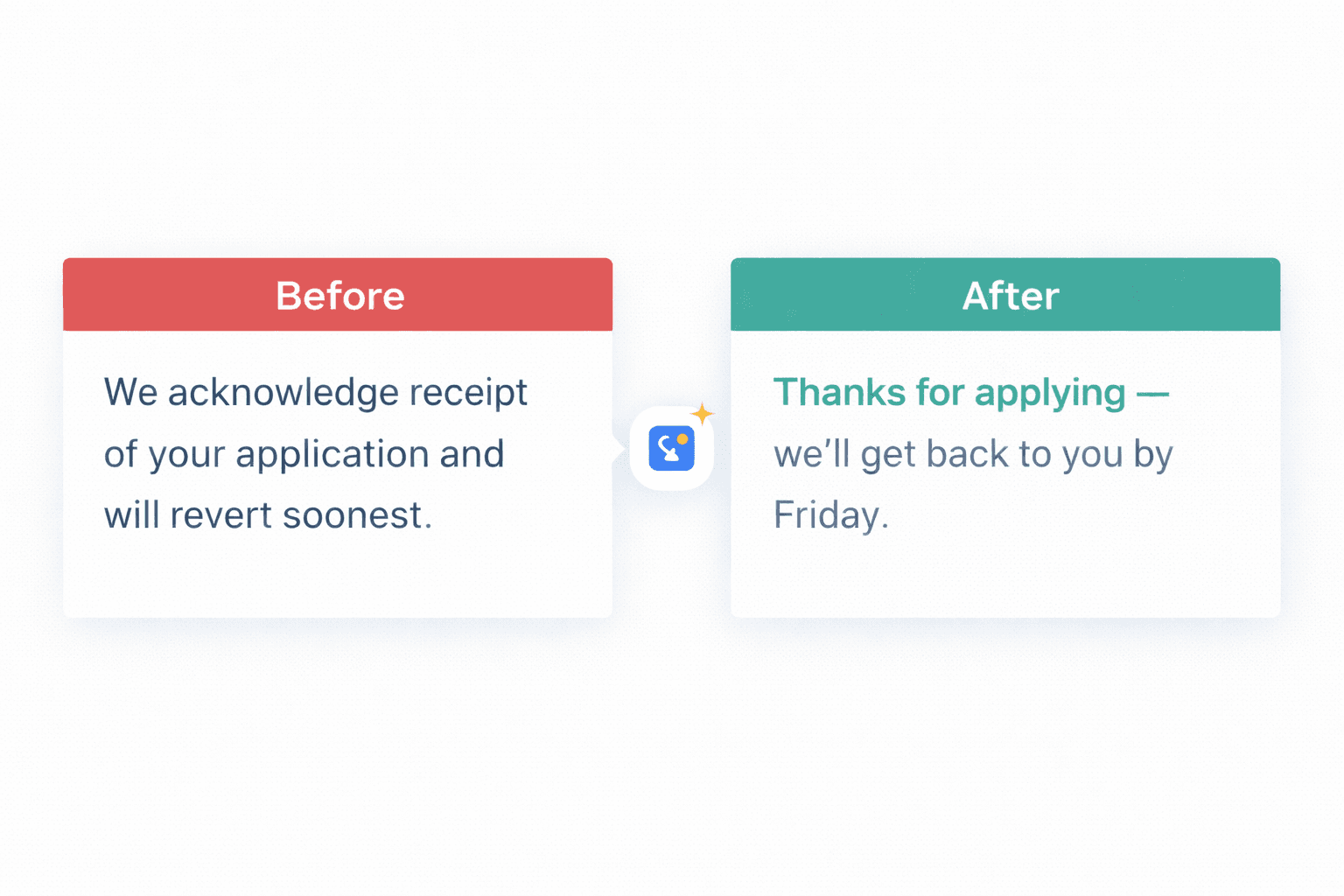
Example: "We acknowledge receipt of your application and will revert soonest."
Better: "Thanks for applying. We have received your application and will get back to you within the week."
Why it matters: Stiff language creates distance. Modern business email should sound professional, not robotic.
If your email still sounds stiff after filling in the template, paste it into AI Grammar Buddy's Email Improver to rewrite it into natural professional English.
Before: "We acknowledge receipt of your application and will revert soonest."
After (AI Grammar Buddy output): "Thanks for applying! We've received your application and will get back to you by Friday with an update."
2. Too vague
Example: "We will be in touch soon."
Better: "We will review applications by March 15 and reach out to shortlisted candidates by March 18."
Why it matters: Vague timelines create uncertainty and lead to follow-up emails. Be specific.
3. Too abrupt
Example: "Your application has been rejected."
Better: "Thank you for your interest in the position. After careful review, we have decided to move forward with other candidates."
Why it matters: Abrupt language sounds harsh. A short thank-you and softer phrasing show respect.
4. Too long
Example: A 400-word rejection email explaining internal hiring criteria, budget constraints, team dynamics, and future possibilities.
Better: A 60-word email thanking the candidate, delivering the decision, and wishing them well.
Why it matters: Long rejection emails feel patronizing. Keep it short and respectful.
5. Missing next steps
Example: "We have received your application."
Better: "We have received your application and will review it this week. If shortlisted, we will reach out by Friday."
Why it matters: Clear next steps reduce anxiety and follow-up emails.
6. Overly formal HR jargon
Example: "Further to your application, we regret to inform you that your candidature has not been shortlisted for progression to the interview stage."
Better: "Thank you for applying. After review, we have decided to move forward with other candidates."
Why it matters: Legal-sounding HR language feels cold. Use plain, professional English instead.
For more on avoiding overly formal phrases, see our guide on please advise meaning.
How to Choose the Right Tone for Your HR Emails
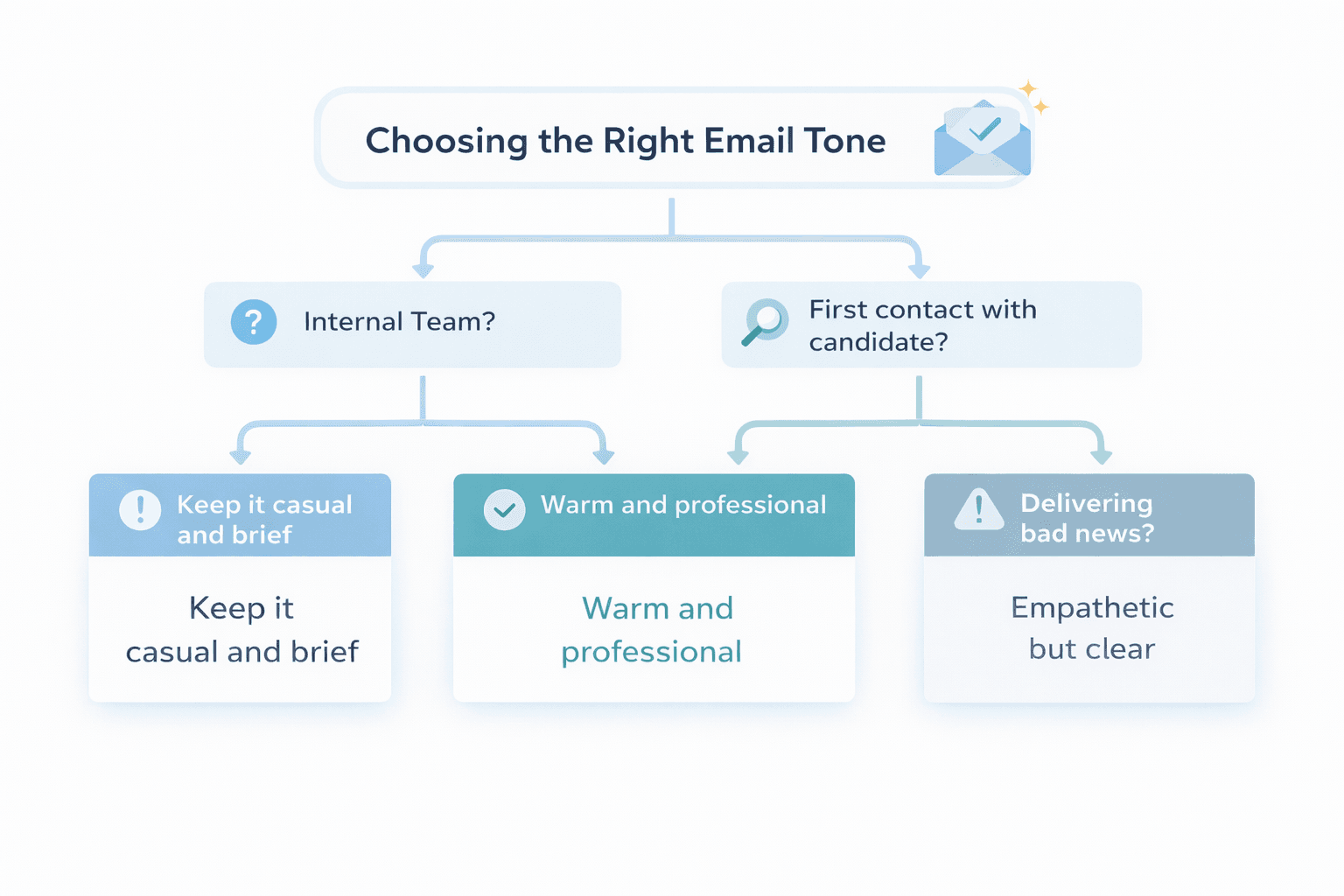
The right tone depends on three factors:
1. Your company culture Startups and creative agencies can be warmer and more casual. Law firms, finance, and corporate environments may lean more formal.
2. The situation Interview invitations can be warm. Legal complaints need to be more careful and structured. Meeting notes can be casual internally, but more polished for clients.
3. The relationship Internal team emails can be relaxed. Candidate-facing emails should be respectful and clear. Client emails should match the tone they use with you.
When in doubt: Aim for warm professionalism. Clear, respectful, and human always works.
How to Personalize Email Templates Quickly
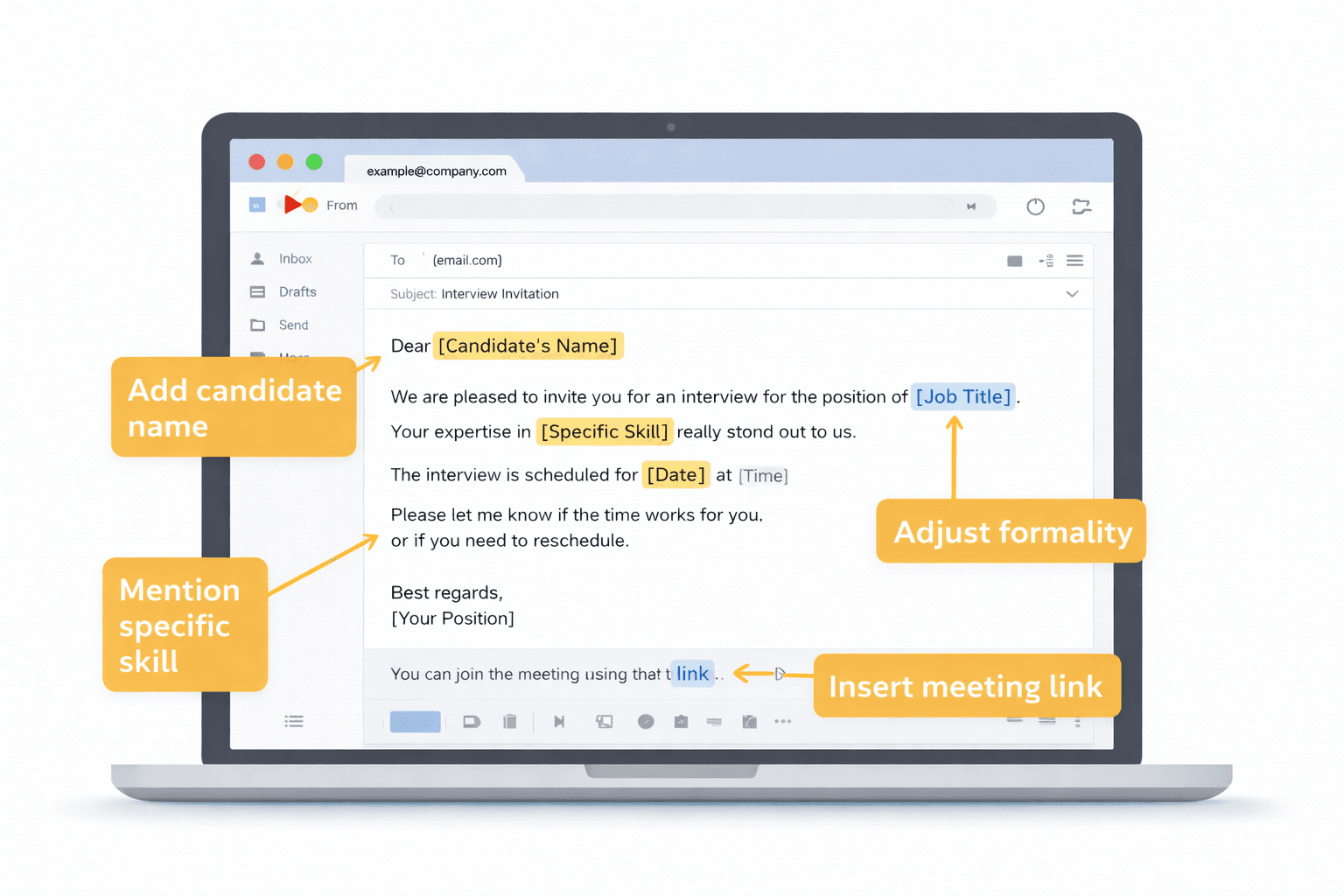
Templates save time, but generic emails feel robotic.
Here is how to personalize fast:
- Fill in all placeholders – Replace [Candidate Name], [Job Title], [Date], [Time], etc.
- Add one specific detail – Reference their portfolio, a project they mentioned, or a skill you noticed.
- Match your company voice – Adjust the level of formality to fit your culture.
- Check for awkward phrasing – Read it out loud or paste it into AI Grammar Buddy to smooth out stiff sentences.
- Proofread before sending – Check your email for grammar mistakes, then verify every candidate name, date, and meeting link manually.
If you are sending several emails in a row, slight variations in wording help them feel less cookie-cutter.
When to Shorten vs When to Sound Warmer
Shorten your email when:
- The recipient is internal and knows the context
- It is a routine confirmation or receipt acknowledgment
- The message is time-sensitive and clarity matters more than warmth
Sound warmer when:
- You are communicating with candidates (especially rejections or invitations)
- It is the first touchpoint with a new hire, client, or vendor
- The email delivers disappointing news and you want to soften the tone
Final Thoughts: Send HR Emails That Sound Human, Not Corporate
The best HR email is one that sounds like a person wrote it, not a policy manual.
Templates give you structure and speed. Personalization makes them human. And tools like AI Grammar Buddy's Email Improver help you turn robotic corporate-speak into clear, natural, professional English that actually gets read and responded to.
If your templates still feel stiff after personalization, that is the signal to run them through AI Grammar Buddy before hitting send — not after you have already made a bad impression.
For related email guidance, explore:
- How to acknowledge receipt of an email professionally
- Follow-up email after no response (templates and timing)
- Please advise meaning and modern alternatives
Use these templates as a foundation, personalize them to fit your workplace, and send emails that sound professional, clear, and human.
Frequently Asked Questions
How do I write an interview invitation email professionally?▼
Include the job title, interview date, time, location or meeting link, format (in-person, virtual, panel), duration, and any materials the candidate should bring. Keep the tone warm but professional, and make it easy to confirm or reschedule.
What should I include in a job rejection email?▼
Thank the candidate for their time and interest, deliver the decision clearly, keep it brief and respectful, and wish them well. Avoid vague language like 'we'll keep your resume on file' unless you genuinely mean it.
How formal should meeting minutes emails be?▼
It depends on the audience. Internal team meeting notes can be casual and action-focused. Client-facing or executive meeting summaries should be more structured and professional. Match the tone to the relationship.
What does confirmation of receipt mean in workplace email?▼
It means confirming that you received a document, application, complaint, file, or message. It does not mean approval or resolution, just acknowledgment that it arrived. Learn more in our acknowledge receipt email guide.
Should I personalize these email templates?▼
Yes. Fill in all placeholders, adjust the tone to match your company culture, and add any specific details like dress code, parking instructions, or interview panel names. Generic templates feel robotic without personalization.
Can AI Grammar Buddy help improve these templates?▼
Absolutely. After filling in your details, paste the email into AI Grammar Buddy's Email Improver to refine tone, fix awkward phrasing, and make it sound more natural and professional.
Next step
Turn this template into your email
Start with the example, then rewrite it for your real situation.
Keep going
Continue with AI Grammar Buddy
AI Grammar Buddy
Email Improver
Paste your draft and rewrite it for clearer, more professional English.
Rewrite My EmailRelated guide
50 Professional Email Templates for Work (With Examples)
Professional email templates for work with examples and quick rewrites from AI Grammar Buddy.
17 March 2026
Related guide
Essential Client & Vendor Email Templates: Apology Email to Customer, Quotations and More
Copy, personalize, and send practical apology email to customer templates, request for quotation email examples, payment reminders, complaint replies, and vendor follow-ups.
13 March 2026
Related guide
Follow Up Email After No Response: 15 Professional Templates for Every Situation
Use these 15 professional follow-up email templates after no response. Includes client, vendor, payment, interview, and second follow-up examples.
11 March 2026